Update: ScreenCoin is no longer sold.
Most parents realize at some point that screen time for children is something that must be managed. But just how to do this in a fair and consistent way is the challenging part. Here are some of the problems we’ve encountered, and I bet you have, too!
- Arguments about how much time is left
- Begging/whining for more time
- Fights with siblings regarding screen time
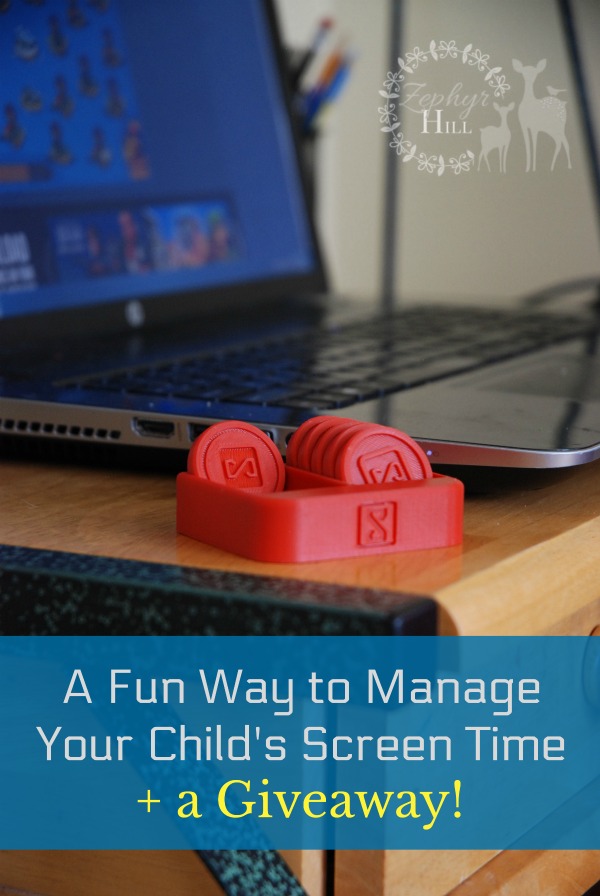
Screen Coin is a simple system which was launched this year by parents to help bring clarity and peace to this whole process. It’s a fun, tactile tool that promotes budgeting, communication and time management. The husband and wife team behind Screen Coin sent us two complimentary sets to test drive with our children ages 8 and up.

Your purchase of Screen Coins includes a set of 6 in the color of your choice, a two-sided tray and a link to the customizable family contract. Regularly priced at $14.99, Screen Coins are temporarily on sale for $9.99.
Screen Coins are made on demand, using the latest 3D printing technology.

Putting down a book is pretty simple; wresting your child away from a computer game is a lot more difficult. It’s a uniquely modern problem that needs to be faced in a creative new way. Electronic devices are tools, but they aren’t easy to put down like other tools (for instance, a hammer). There’s a temptation to just keep going long after you’ve finished what you sat down to do. We parents are guilty of this, too (Facebook, cough cough)!

So let’s look at how Screen Coins work:
The System
When your new set of Screen Coins arrives in the mail, there will also be a link to the Contract Designer, plus a password.
Answer a few questions online and customize the contract as it applies to your family, including details like how many minutes you assign to each coin and special rules like “Arguing when all the coins are finished for the day can result in the loss of coins.” After making the contract, a printable PDF will arrive in your inbox. I strongly encourage you to include your child in the contract-making process, so that there’s a clear understanding of the terms. Everyone signs, and you’re on your way!
When your child sits down with a device, set the tray of screen coins beside him. Depending upon age, briefly go over the terms and then start a timer. You can keep track of time with pretty much anything – your SmartPhone, the oven time, a kitchen timer, etc. As time goes by, used coins are moved to the other side. When the coins run out, screen time is over!
The Results
The advantages of the Screen Coin system became apparent from the get-go:
- The contract eliminated misunderstandings. Everyone knew what the terms were and they had signed their name.
- When the coins were used up, there were no arguments because there was a consequence (you’ll lose coins for next time!)
- They were helping to manage their own time instead of Mama and Daddy playing policemen.
- They actually like the system. The written rules, the colorful coins, etc. This is a huge plus!
- The coins help children, especially younger ones, visualize their time in a concrete way.
One day, you won’t be there to monitor your children’s time on devices. And you may worry that without any accountability they will sit in their apartment for hours every day playing video games. Unless you start teaching them now. A system like Screen Coin that gets your child heavily involved in the management process is crucial for instilling self-control.
Using Screen Coins for Different Age Groups
Susanna is 7 and Samuel is 8. One of the biggest advantages I noticed is how Screen Coins help demystify time. “You have 1 hour” can be hard to understand, and it’s no wonder that a child might argue when time runs out. “Are you sure that was really an hour, Mama??”
Along those same lines, I found that smaller time increments work better with little children. It’s easier to grasp what 10 minutes feel like rather than 30 minutes.
Benjamin is 10. He’s in what I would call the Screen Coin sweet spot, because he fully understands both time and adding/subtracting, and is also mature enough to be heavily involved in the whole system, from the creation of the contract to setting his own timer and moving coins over independently. After I explained the rules, there was no checking in needed. When the timer went off at 1 hour, I poked my head in the school room and saw him move the last coin over and shut the computer. Success!
Joseph is 15. Although not in the target Screen Coin age range, he wanted to try the system because, well, it was new and everyone else was doing it! As a teenager, he feels capable of tracking his own time using his watch. However, if we decide to let them start earning coins, Joseph said he would like to use Screen Coins so he could have something tangible to keep track of it.
Samuel and Benjamin came up with a neat idea using Screen Coins. They often like to split their turns between two devices – for instance, 30 minutes on the PC and 30 minutes on the Kindle. They traded coins so they each have 3 green and 3 red. This helps them to visualize their time increments for different devices.
Be sure to give lots of encouragement and high fives as you see them using the system and abiding by the rules!

Suggestions/Room for Improvement?
- There may be things in the contract that don’t apply to your situation, but need to be filled in. For instance, start and stop times. Ours change every week because of having a large family and a flexible homeschool schedule. Andy assured me that Screen Coin is open to feedback and the contract design is certainly open to adjustment in the future.
- More than one set of Screen Coins may need to be purchased for children who are allowed to earn additional coins beyond the set of 6.
- When using the system for young children, you do have to stay on top of the time. That means resetting the timer over and over for each coin, or setting it for the full time and then checking in regularly with verbal cues so they can move the coins over.
Do you have any thoughts to share on the Screen Coin system, or on monitoring devices in general?
